

Overview
Bring Your Own Auth (BYOA) lets you authenticate your own users to EkaCare agents without an OIDC flow. Your backend builds a short-lived token containing the user’s identity, secures it with your shared secret, and sends it to EkaCare — which looks up your secret by its Key ID, verifies the token, and trusts the claims inside. BYOA supports two token formats:- Signed JWT (JWS) — the default. The claims are signed (HS256) with your shared secret. The payload is readable but tamper-proof. Lighter and simpler — use this unless you have a specific reason not to.
- Encrypted JWE — an optional, heavier alternative where the claims are encrypted. Use it only when the token travels somewhere it could be logged or inspected (e.g. a URL query parameter) and carries genuinely sensitive data. See Encrypted Token (JWE).
Both formats use the same shared secret and Key ID from the same BYOA credential. The
kid header
tells EkaCare which secret to use; the token format (signed vs encrypted) is detected automatically.JWT or JWE?
Before You Begin
Create a BYOA credential in the Eka Developer Console. You will need:- Key ID — the public identifier for your credential (e.g.
byoa_xxxxxxxxxxxxxxxx); goes in the token’skidheader. - Shared secret — used to sign (JWT) or encrypt (JWE) the token. Shown only once at creation.
- Issuer — the issuer URL you registered on the credential; the token’s
issclaim must match it exactly.
How It Works
1
Create a credential
In the Eka Developer Console (BYOA → Create) you get a Key ID and a
shared secret. The secret is shown only once — copy it immediately.
2
Build the claims
On your backend, assemble the user’s identity claims (see Token Structure).
3
Sign as a JWT
Sign the claims with your shared secret using HS256, with the protected header
kid set to your
Key ID. (Or, for the sensitive-query-param case, encrypt as a JWE.)4
Send it
Hand the token to your embedded MedAssist widget — via the
auth-token attribute or
EkaMedAssist.init({ authToken }). See Send the Token.5
EkaCare verifies
EkaCare looks up your secret and registered issuer by the
kid, verifies the signature, and trusts
the verified claims.Token Structure
Thex-auth-token is a compact JWT (JWS) with a signed header and a payload of claims.
Header
kid— your credential’s Key ID.alg—HS256(HMAC-SHA256; the shared secret is the signing key).typ—JWT.
Payload claims
string
required
Your issuer — must exactly match the issuer registered on your credential.
string
required
Intended audience. Always
https://eka.care.string
Subject — your stable user identifier (partner user id). Leave it empty (
"") if you identify users
only by mobile number (e.g. WhatsApp), where the mobile claim is the identifier instead.string
The user’s mobile number, with country code.
number
required
Issued-at time, in epoch seconds (UTC).
number
required
Expiry time, in epoch seconds. Keep it short —
iat + 300 (about 5 minutes).string
Recommended. A unique ID per request so EkaCare can reject replays of the same token.
The shared secret is a base64url-encoded 32-byte key. Decode it to 32 raw bytes before using it as the
HS256 HMAC signing key.
Generate the Token
Build the claims and sign them as a JWT with your shared secret (HS256, header kid). The shared
secret is base64url-decoded to a 32-byte key.
Send the Token
The MedAssist widget is EkaCare’s embeddable chat widget. Copy its embed snippet from your agent’s Widget tab in the Developer Console (or see the widget quickstart), then add the token to it.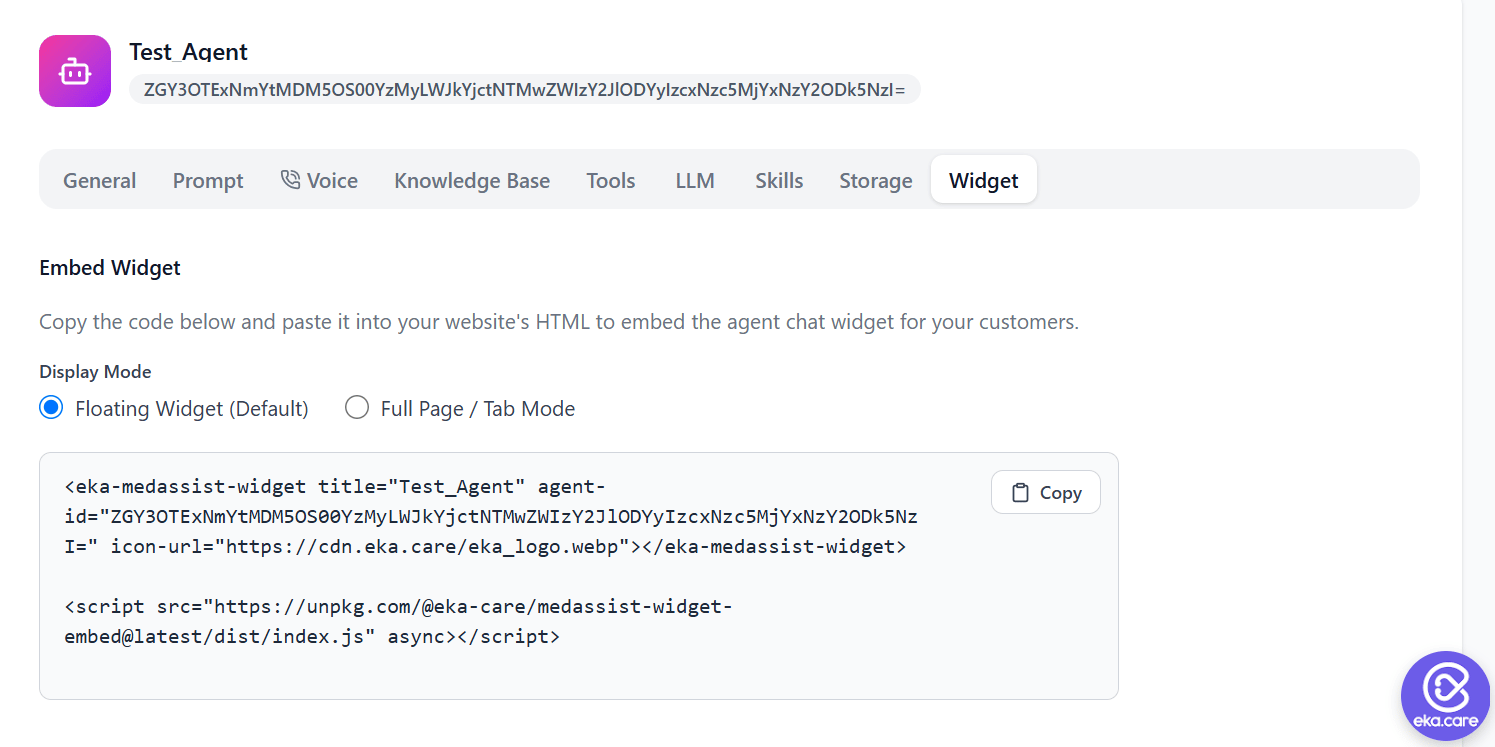
- Custom element — set the
auth-tokenattribute on the<eka-medassist-widget>element. Best when you can render the token into the page server-side. See the widget quickstart. - JavaScript — pass
authTokentoEkaMedAssist.init(). Best when the token is dynamic (e.g. minted per logged-in user at runtime). See the JavaScript API.
How EkaCare Verifies
When EkaCare receives the token, it:- Reads the
kidfrom the token header and looks up the matching shared secret and registered issuer. - Verifies the JWT signature with your secret (or decrypts it, if it’s a JWE).
- Verifies the claims —
issmatches the registered issuer,audishttps://eka.care, andiatandexpare within the allowed window. If you include ajti, it must not have been seen before (replay protection).
Encrypted Token (JWE)
JWE is an optional alternative to the default signed JWT. It’s heavier than a JWT. Only use it when
the token is sent somewhere observable — most commonly a URL query parameter (which can be logged
by proxies, servers, and browser history) — and its payload holds highly sensitive information that
must not be readable in transit. Otherwise, use a signed JWT.
Header
kid— your credential’s Key ID.alg—dir(the shared secret is used directly as the encryption key).enc—A256GCM(content encryption).
The shared secret is a base64url-encoded 32-byte key. Decode it to 32 raw bytes before using it as the
A256GCM content-encryption key.Generate the JWE
Build the claims, encrypt them as a JWE with your shared secret (alg: dir, enc: A256GCM, header
kid), and serialize to compact form. The shared secret is base64url-decoded to a 32-byte key.
kid, decrypts it, and verifies
the same claims as a JWT.