> ## Documentation Index
> Fetch the complete documentation index at: https://developer.eka.care/llms.txt
> Use this file to discover all available pages before exploring further.
# Bring Your Own Auth (BYOA)
> Authenticate your own users to EkaCare agents with an encrypted JWE token signed by your shared secret
## Overview
**Bring Your Own Auth (BYOA)** lets you authenticate your own users to EkaCare agents without an OIDC
flow. Your backend builds a short-lived **encrypted token (JWE)** containing the user's identity,
encrypts it with your shared secret, and sends it to EkaCare — which looks up your secret by its
**Key ID**, decrypts the token, verifies it, and trusts the claims inside.
The token is a **JWE** (encrypted), not a signed JWT (JWS). Your shared secret both identifies you
(via its Key ID) and decrypts the payload.
**Use it when** your client has no OIDC/OAuth flow and you want to pass user data (mobile, name, etc.)
to EkaCare in encrypted form.
***
## How It Works
In the [Eka Developer Console](https://console.eka.care) (BYOA → Create) you get a **Key ID** and a
**shared secret**. The secret is shown only once — copy it immediately.
On your backend, assemble the user's identity claims (see [Token Structure](#token-structure)).
Encrypt the claims using your shared secret: `alg: dir`, `enc: A256GCM`, with the protected header
`kid` set to your Key ID.
Hand the token to your embedded MedAssist widget — via the `auth-token` attribute or
`EkaMedAssist.init({ authToken })`. See [Send the Token](#send-the-token).
EkaCare looks up your secret and registered issuer by the `kid`, decrypts the token, and trusts the
verified claims.
***
## Before You Begin
Create a BYOA credential in the [Eka Developer Console](https://console.eka.care). You will need:
* **Key ID** — the public identifier for your credential (e.g. `byoa_xxxxxxxxxxxxxxxx`); goes in the
token's `kid` header.
* **Shared secret** — used to encrypt the token. Shown only once at creation.
* **Issuer** — the issuer URL you registered on the credential; the token's `iss` claim must match it
exactly.
The shared secret is shown only once. Store it securely on your backend and never expose it in
client-side code. If it is lost or leaked, revoke the credential and create a new one.
***
## Token Structure
The `x-auth-token` is a compact **JWE** with a protected header and an encrypted payload of claims.
### Header
```json theme={null}
{ "kid": "byoa_xxxxxxxxxxxxxxxx", "alg": "dir", "enc": "A256GCM" }
```
* `kid` — your credential's Key ID.
* `alg` — `dir` (the shared secret is used directly as the encryption key).
* `enc` — `A256GCM` (content encryption).
### Payload claims
Your issuer — must exactly match the issuer registered on your credential.
Intended audience. Always `https://eka.care`.
Subject — the user identifier (for example, the mobile number with country code).
The user's mobile number, with country code.
Issued-at time, in epoch seconds (UTC).
Expiry time, in epoch seconds. Keep it short — `iat + 300` (about 5 minutes).
Recommended. A unique ID per request so EkaCare can reject replays of the same token.
Example payload:
```json theme={null}
{
"iss": "https://partner.example.com",
"aud": "https://eka.care",
"sub": "+919876543210",
"mobile_number": "+919876543210",
"iat": 1749600000,
"exp": 1749600300
}
```
The shared secret is a base64url-encoded 32-byte key. Decode it to 32 raw bytes before using it as the
`A256GCM` content-encryption key.
***
## Generate the Token
Build the claims, encrypt them as a JWE with your shared secret (`alg: dir`, `enc: A256GCM`, header
`kid`), and serialize to compact form. The shared secret is base64url-decoded to a 32-byte key.
```python Python theme={null}
import base64
import time
import orjson
from jwcrypto import jwe, jwk
def mint_partner_token() -> str:
# Provided by Eka
kid = "kid_v1"
secret = "dGVzdHNlY3JldGtleWZvcmp3ZXRlc3QxMjM0NTY3ODk"
# Your values
now = int(time.time())
claims = {
"iss": "https://partner.example.com",
"aud": "https://eka.care",
"sub": "+919876543210",
"mobile_number": "+919876543210",
"iat": now,
"exp": now + 300,
}
# Build key
padded = secret + "=" * (-len(secret) % 4)
raw = base64.urlsafe_b64decode(padded)
k_b64 = base64.urlsafe_b64encode(raw).rstrip(b"=").decode()
jwk_key = jwk.JWK(kty="oct", k=k_b64)
# Encrypt
token_obj = jwe.JWE(
plaintext=orjson.dumps(claims),
protected=orjson.dumps({"alg": "dir", "enc": "A256GCM", "kid": kid}).decode(),
)
token_obj.add_recipient(jwk_key)
return token_obj.serialize(compact=True)
token = mint_partner_token()
print(token)
```
```javascript Node.js theme={null}
import { CompactEncrypt } from 'jose';
async function mintPartnerToken() {
const kid = "kid_v1";
const secret = "dGVzdHNlY3JldGtleWZvcmp3ZXRlc3QxMjM0NTY3ODk";
const now = Math.floor(Date.now() / 1000);
const claims = {
iss: "https://partner.example.com",
aud: "https://eka.care",
sub: "+919876543210",
mobile_number: "+919876543210",
iat: now,
exp: now + 300,
};
const key = Buffer.from(secret, "base64url");
const token = await new CompactEncrypt(
Buffer.from(JSON.stringify(claims))
)
.setProtectedHeader({
alg: "dir",
enc: "A256GCM",
kid,
})
.encrypt(key);
return token;
}
mintPartnerToken()
.then(token => {
console.log("\nGenerated JWE:\n");
console.log(token);
})
.catch(console.error);
```
```go Go theme={null}
package main
import (
"encoding/base64"
"encoding/json"
"fmt"
"time"
jose "github.com/go-jose/go-jose/v4"
)
func mintPartnerToken() (string, error) {
kid := "kid_v1"
secret := "dGVzdHNlY3JldGtleWZvcmp3ZXRlc3QxMjM0NTY3ODk"
now := time.Now().Unix()
claims := map[string]interface{}{
"iss": "https://partner.example.com",
"aud": "https://eka.care",
"sub": "+919876543210",
"mobile_number": "+919876543210",
"iat": now,
"exp": now + 300,
}
payload, err := json.Marshal(claims)
if err != nil {
return "", err
}
key, err := base64.RawURLEncoding.DecodeString(secret)
if err != nil {
return "", err
}
encrypter, err := jose.NewEncrypter(
jose.A256GCM,
jose.Recipient{
Algorithm: jose.DIRECT,
Key: key,
},
(&jose.EncrypterOptions{}).WithHeader("kid", kid),
)
if err != nil {
return "", err
}
obj, err := encrypter.Encrypt(payload)
if err != nil {
return "", err
}
return obj.CompactSerialize()
}
func main() {
token, err := mintPartnerToken()
if err != nil {
panic(err)
}
fmt.Println(token)
}
```
```java Java theme={null}
import org.jose4j.jwe.JsonWebEncryption;
import org.jose4j.jwe.ContentEncryptionAlgorithmIdentifiers;
import org.jose4j.jwe.KeyManagementAlgorithmIdentifiers;
import org.jose4j.keys.AesKey;
import java.util.Base64;
public class GenerateJWE {
public static void main(String[] args) throws Exception {
String kid = "kid_v1";
String secret = "dGVzdHNlY3JldGtleWZvcmp3ZXRlc3QxMjM0NTY3ODk";
long now = System.currentTimeMillis() / 1000;
String payload = String.format("""
{
"iss":"https://partner.example.com",
"aud":"https://eka.care",
"sub":"+919876543210",
"mobile_number":"+919876543210",
"iat":%d,
"exp":%d
}
""", now, now + 300);
byte[] keyBytes = Base64.getUrlDecoder().decode(secret);
AesKey key = new AesKey(keyBytes);
JsonWebEncryption jwe = new JsonWebEncryption();
jwe.setPayload(payload);
jwe.setAlgorithmHeaderValue(
KeyManagementAlgorithmIdentifiers.DIRECT);
jwe.setEncryptionMethodHeaderParameter(
ContentEncryptionAlgorithmIdentifiers.AES_256_GCM);
jwe.setKeyIdHeaderValue(kid);
jwe.setKey(key);
String token = jwe.getCompactSerialization();
System.out.println(token);
}
}
```
***
## Send the Token
The **MedAssist widget** is EkaCare's embeddable chat widget. Copy its embed snippet from your agent's
**Widget** tab in the [Developer Console](https://console.eka.care) (or see the
[widget quickstart](/ai-tools/synapse/embed/quickstart)), then add the token to it.
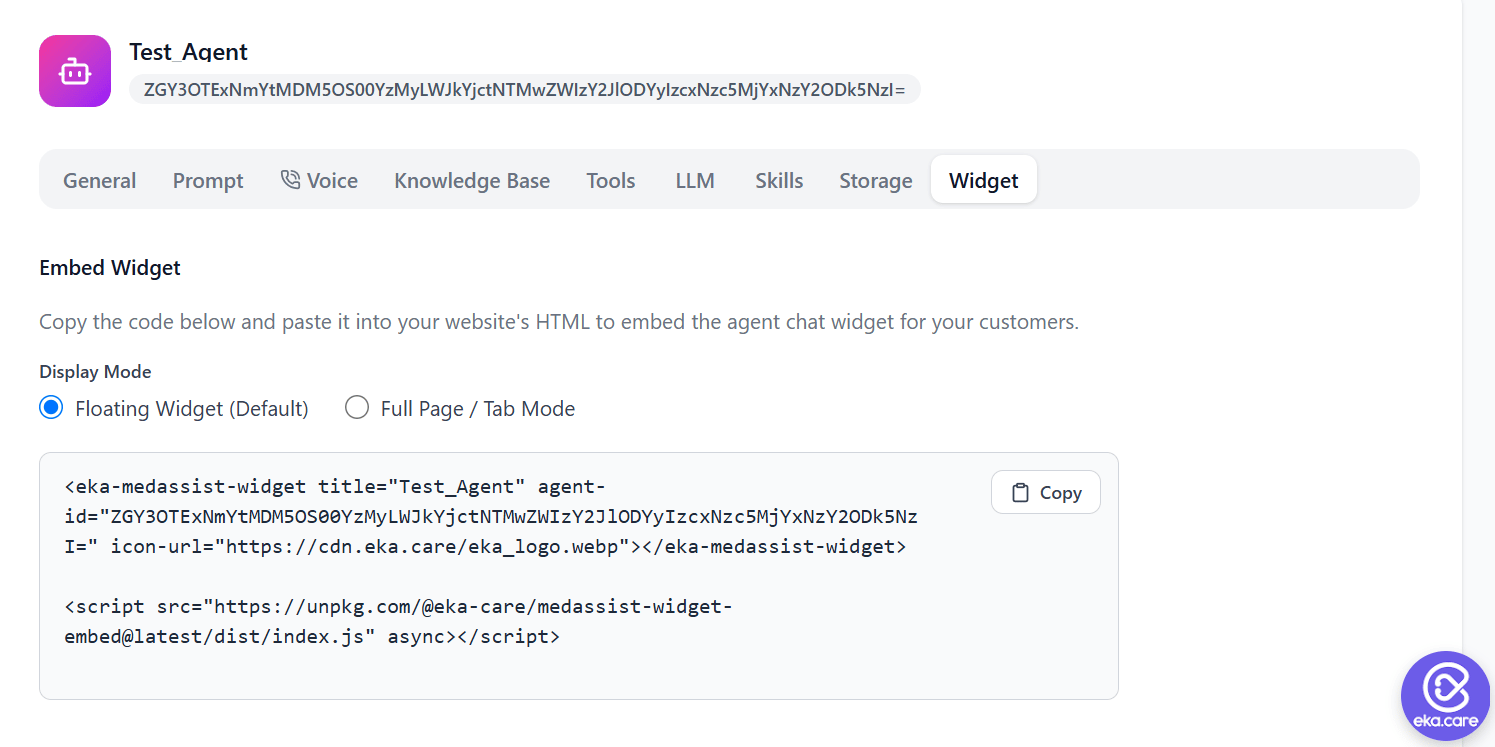 There are two ways to pass the token:
```html Custom element theme={null}
```
```html JavaScript theme={null}
```
* **Custom element** — set the `auth-token` attribute on the `` element. Best
when you can render the token into the page server-side. See the
[widget quickstart](/ai-tools/synapse/embed/quickstart).
* **JavaScript** — pass `authToken` to `EkaMedAssist.init()`. Best when the token is dynamic (e.g.
minted per logged-in user at runtime). See the
[JavaScript API](/ai-tools/synapse/embed/javascript-api).
***
## How EkaCare Verifies
When EkaCare receives the token, it:
1. Reads the `kid` from the token header and looks up the matching **shared secret** and registered
**issuer**.
2. Decrypts the JWE with your secret.
3. Verifies the claims — `iss` matches the registered issuer, `aud` is `https://eka.care`, and `iat`
and `exp` are within the allowed window. If you include a `jti`, it must not have been seen before
(replay protection).
If any check fails, the request is rejected.
***
## Best Practices
* Generate tokens **server-side only** — never ship the shared secret to a browser or mobile app.
* Keep `exp` short (\~5 minutes) and use a fresh `jti` for every request.
* Rotate by revoking the credential and creating a new one, then update your agents to the new Key ID.
There are two ways to pass the token:
```html Custom element theme={null}
```
```html JavaScript theme={null}
```
* **Custom element** — set the `auth-token` attribute on the `` element. Best
when you can render the token into the page server-side. See the
[widget quickstart](/ai-tools/synapse/embed/quickstart).
* **JavaScript** — pass `authToken` to `EkaMedAssist.init()`. Best when the token is dynamic (e.g.
minted per logged-in user at runtime). See the
[JavaScript API](/ai-tools/synapse/embed/javascript-api).
***
## How EkaCare Verifies
When EkaCare receives the token, it:
1. Reads the `kid` from the token header and looks up the matching **shared secret** and registered
**issuer**.
2. Decrypts the JWE with your secret.
3. Verifies the claims — `iss` matches the registered issuer, `aud` is `https://eka.care`, and `iat`
and `exp` are within the allowed window. If you include a `jti`, it must not have been seen before
(replay protection).
If any check fails, the request is rejected.
***
## Best Practices
* Generate tokens **server-side only** — never ship the shared secret to a browser or mobile app.
* Keep `exp` short (\~5 minutes) and use a fresh `jti` for every request.
* Rotate by revoking the credential and creating a new one, then update your agents to the new Key ID.